Whova Event App Pricing Review: The Full Breakdown, Features & Alternative Options

Table of Contents
- Whova Event App Cost: The Full Breakdown
- What Features Are Included in Whova’s Event App Pricing?
- When Is Whova’s Pricing Right For You?
- You're managing a large-scale conference with concurrent sessions, exhibitors, and 1000+ attendees
- Attendee networking is a critical part of your event marketing strategy
- You have a large external speaker roster
- You have sponsors or exhibitors who need lead retrieval
- You run the same large-scale event annually
- When is Whova’s Pricing Overkill?
- Need an Affordable Event App Like Whova?
- Is Whova worth the investment?
Whova doesn’t have a specific published pricing. If you’re finding it difficult to plan, budget, and accurately assess whether the platform is right for you, here’s what you really need to know:
The total cost you’ll pay for Whova’s event app depends on four cost layers:
A custom per-event fee that covers full platform access
A registration fee of 3.0% + $0.99 on every paid ticket
Add-on costs for features like unlimited document uploads, reported by users at up to $2,000 extra
A promotional multi-event package for organisers committing to several events upfront
In this article, we cover a full breakdown of those four pricing anchors and the features behind them, so you can make an informed decision on whether Whova is right-sized or overkill for your budget.
Our finding in summary:
If you run a handful of events per year with one or two people managing the planning, Whova's pricing is likely overkill for your needs. In that case, a purpose-built event app with the essential features, and transparent, affordable pricing is a better fit.
LineUpr is one option worth considering. Starting from $119 per event, you can build a full professional event app in under an hour — no developers, no sales call, no annual contract. Build it free and preview it with your team before paying anything. [Start now ]
Let's start with the full pricing breakdown.
Whova Event App Cost: The Full Breakdown
How does Whova’s custom pricing work?
For the custom pricing, Whova charges you per-event fee for its all-in-one event management platform. That pricing includes access to the event attendee app, event planning and registration tools, virtual and hybrid event solutions, and more.
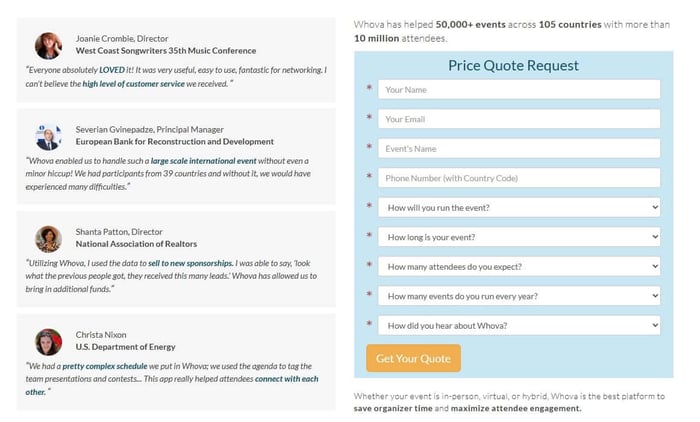
Factors that determines how much you might pay include:
Your event format. In-person, virtual or hybrid
The duration of your event. Half-day, full-day, or multiple days.
How many attendees you expect to attend. The pricing per attendee is scoped from fewer than 500 to over 60,000
The number of events you run yearly. The pricing changes depending on whether you run a few events [1-2 per year], to over 10 events.
How much is Whova’s registration fee?
As for the registration fee, Whova charges 3.0% + $0.99 per paid ticket. If you host events that do not charge attendees, you can create and distribute unlimited free tickets through the platform without paying a ticketing fee.
Does Whova have add-ons and hidden costs?
Yes, Whova offers add-ons and some additional costs. Typically, you’d have to pay these add-on costs when your event scope and needs reach a specific threshold. Here’s some instances, based on user reviews and verified reports.
Document upload: Document uploads, for example, are capped — unlimited uploads cost an additional $2,000 on top of the base fee, according to organisers who've shared their experience on Reddit. It's worth asking Whova specifically what's included in your quote and what triggers an additional charge before you sign.
Sponsor and exhibitor management: If you plan to showcase your sponsors and exhibitors and equip them with powerful lead generation tools such as business card scanning, promotional opportunities, QR code scanning, and much more, it’s worth requesting more info to know what these cost in Whova.
Contract renewal: Multiple organisers on Reddit and G2 report that Whova increases prices at each contract renewal, with no published rate and no advance notice of how much.
What about promos?
Does Whova offer promo and discounts?
Yes, Whova offers promos and discounts. If you plan to use Whova for multiple events throughout the year, Whova can offer a multi-event package deal — but you have to commit to all events upfront at the time of signing.
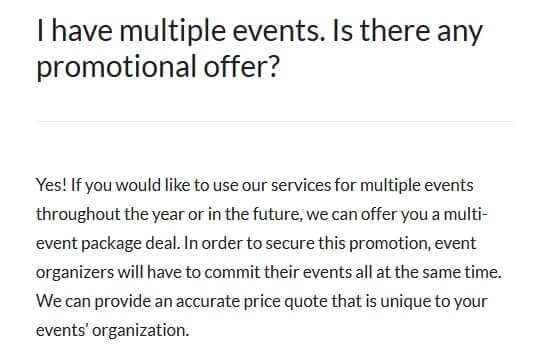
Keynote: There is no separate pricing for Whova's event app. To gain access you need to also sign up for the full platform, priced per event. While this gives you access to an all-in-one platform, it might not be cost-effective if you already have registration sorted elsewhere.
Here's a breakdown of what Whova's platform actually includes — and how to decide whether you need all of it.
What Features Are Included in Whova’s Event App Pricing?
Depending on your event size, type, and attendee number, here are the features of Whova event you might be paying for:
Registration and check-in: Whova handles end-to-end attendee registration, including custom registration forms, ticket types, and name badge generation. On-site check-in is managed through the app, with QR code scanning for fast entry.
Attendee networking: The platform includes attendee profiles, in-app messaging, a community board, and a contact exchange function. For conferences where professional networking is a primary reason attendees show up, the networking suite adds measurable value.
Speaker management: Whova includes a dedicated speaker portal that handles speaker onboarding, profile pages, session assignments, and direct communication between organisers and speakers. It is suitable for events with large external speaker rosters.
Agenda management: Attendees can build personal schedules within the app. For multi-day, multi-track conferences where the agenda is complex and subject to last-minute changes, this is a core feature
Sponsor and exhibitor management tools: Whova includes virtual exhibitor booths, sponsor profile pages, and lead retrieval tools that allow exhibitors to scan and capture attendee contact information.
Post-event analytics: Whova provides reporting on session attendance, app engagement, and networking activity. For organisations that report on event ROI to stakeholders or use engagement data to plan future events, this adds value beyond the event itself.
When Is Whova’s Pricing Right For You?
Whova’s event app pricing might fit your needs if:
You're managing a large-scale conference with concurrent sessions, exhibitors, and 1000+ attendees
Attendee networking is a critical part of your event marketing strategy
Your have a large external speaker roster
You have sponsors or exhibitors who need lead retrieval
You run the same large-scale event annually
You're managing a large-scale conference with concurrent sessions, exhibitors, and 1000+ attendees
Say you’re planning an event with multiple concurrent sessions across more than one day, hundreds of attendees, and several moving parts running simultaneously. At that scale, managing separate tools starts to compound in ways that are hard to anticipate until you're in it.
Registration in one system, check-in in another, agenda updates somewhere else, speaker communication over email, attendee engagement through a separate tool. On event day, that fragmentation becomes a real challenge.
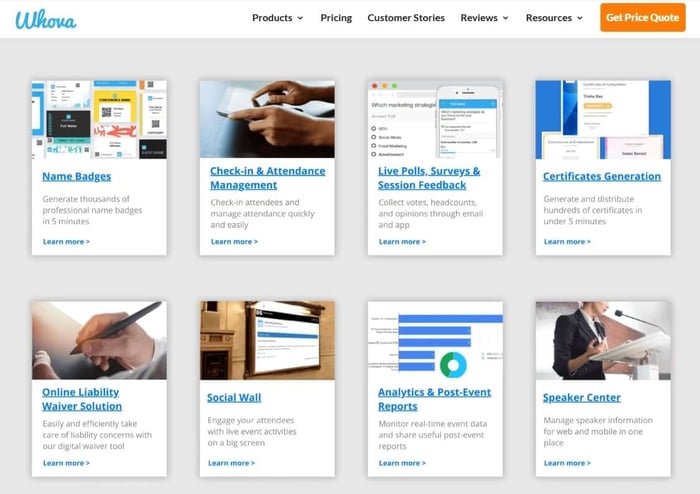
Whova's consolidation of all of those functions into a single platform makes it possible for your team to focus on what’s most important to you instead of context-switching between systems, chasing data across dashboards, or troubleshooting integration failures when something breaks thirty minutes before a keynote.
And it’s not just our words, organisers running genuinely large events reflect this in their reviews. Carrie W., a marketing manager on G2, describes Whova as "one-stop shopping to improve large-scale event logistics and attendee engagement."
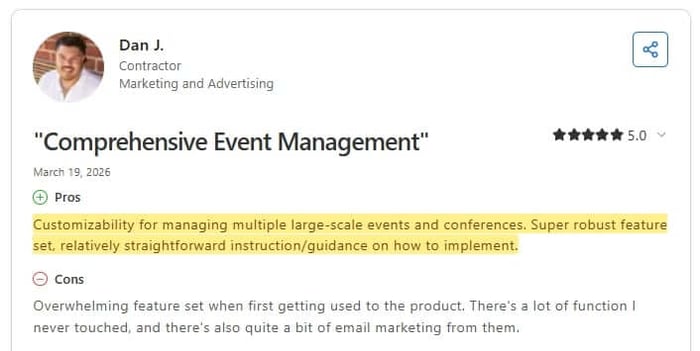
Dan J. on Capterra, who manages multiple large-scale events and conferences, praises the platform's "customizability" and "super robust feature set" — noting it is "relatively straightforward" to implement once you're familiar with the scope of what it offers.
That scope is the point. At large-scale events, you need all of it.
Attendee networking is a critical part of your event marketing strategy
If you’re running industry summits, academic conferences, trade association events, you already know that hallway conversation is often as valuable as the keynote. Attendees come to meet people, make contacts, and build relationships; which in turn boosts your rep and drives revenue.
In that case, Whova's networking suite is one of the stronger implementations in the market at its price point. It goes well beyond a simple attendee directory.
Attendees can build out professional profiles
Message each other directly within the app
Participate in a community board that's active before the event even starts, and
Exchange contact details through a built-in digital card function.
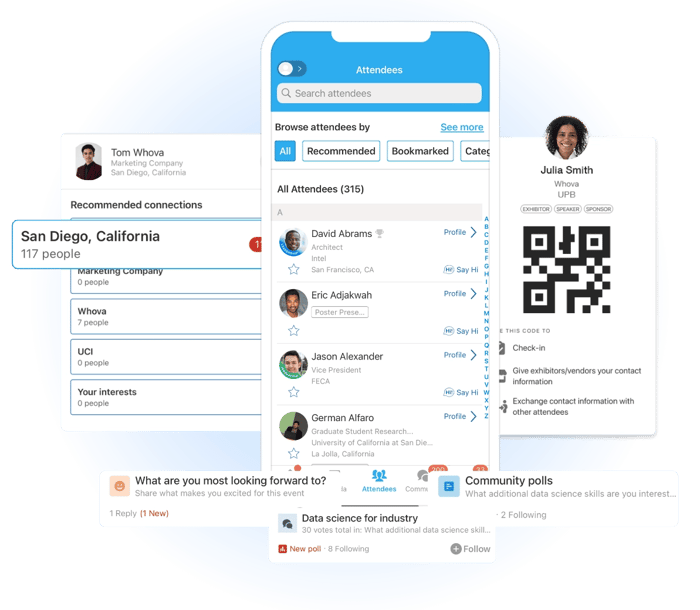
More so, the community board in particular means networking begins days or weeks before anyone arrives. Attendees can introduce themselves, post what they're looking to discuss, and arrange meetings in advance.
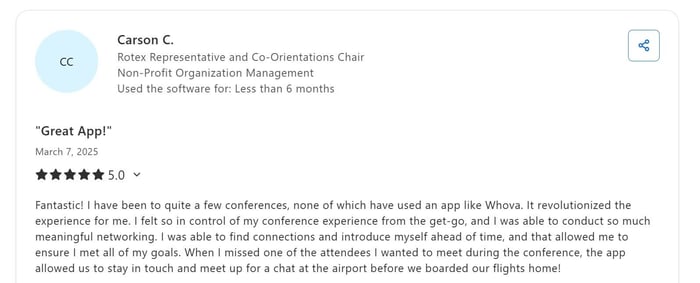
Whova users who have tried the attendee networking features testify. Carson C. on Capterra describes using Whova to find connections and introduce himself before the conference, ensuring he met all his goals.
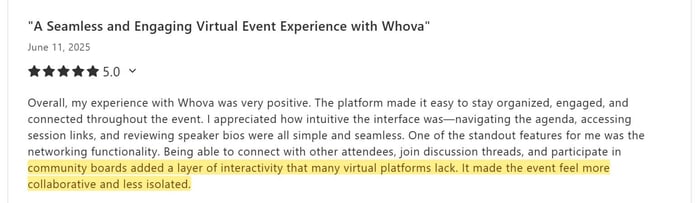
Nydia B. notes that the networking functionality "added a layer of interactivity that many virtual platforms lack," making the event feel "more collaborative and less isolated." Vinícius L. specifically highlights the mix of groups, meetups, and relationship-building as the platform's standout value.
So, if attendee networking is central to why your event exists, this feature set could justify a meaningful portion of the cost.
You have a large external speaker roster
Do you need to coordinate with 15, 20, or 30 external speakers? Whether that’s for large industry conferences, academic symposiums, and multi-track professional summits; managing that list over email, across that many people, is where things fall apart.
Whova's speaker portal centralizes the entire process. Say you’re inviting people prominent in their field who need to submit bios, headshots, session descriptions, and presentation files through a process that starts months before the event, here’s how Whova helps:
Speakers are onboarded through a dedicated portal, their profiles are managed in one place, session assignments are handled within the platform, and communication between organisers and speakers runs through the same system. For events at this scale, the reduction in coordination overhead alone is significant.
You have sponsors or exhibitors who need lead retrieval
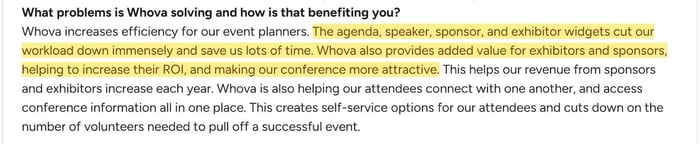
When sponsors and exhibitors are paying for floor space or a virtual booth, driving qualified leads is their primary expectation, not just logo placement. Whova's exhibitor tools are built around that specific outcome.
Exhibitors can scan attendee badges or QR codes directly in the app to capture contact information,
Tag leads with notes during the conversation, and
Export their full contact list after the event.
That lead retrieval mechanic turns the event app into a direct ROI tool for sponsors. And for events where sponsor satisfaction determines whether they return and at what spend level, that matters.
For trade shows and large industry conferences where sponsor and exhibitor ROI is measured in contacts captured, this suite might justify a significant portion of what Whova charges.
You run the same large-scale event annually
For event managers whose event fits the profile above and runs on an annual cycle, Whova's multi-event promotional offer is also worth factoring in. Committing to multiple events upfront unlocks package pricing that brings the per-event cost down — and if the platform is working well at genuine scale, that commitment is easier to justify. The switching cost argument is legitimate here: not as a reason to avoid evaluating alternatives, but as a genuine consideration when the platform has proven itself at the right level of complexity and the promotional pricing makes the annual commitment more defensible.
When is Whova’s Pricing Overkill?
Whova’s event app pricing might be overkill for your needs if:
You run two to three small, less complex events yearly
You already have registration handled and just need an event app
Your team is small and your event needs to move fast
You run two to three small, less complex events yearly
For organisers running smaller or less complex events, Whova’s perceived cost is worth reconsidering. Because, in most cases, the gap between what's available and what's actually used is wide.
As we explained above, Whova is priced based on event format, duration, attendee numbers, and number of events you host yearly. If you’re not running multiple concurrent tracks, large external speaker rosters, active exhibitor programs, and complex registration workflows — all at the same time, a better priced Whova alternative is worth considering.
Several past Whova users have highlighted this feature-to-pricing disparity. Dan J. on Capterra, reviewing Whova for managing multiple large-scale conferences, notes that alongside the robust feature set there was "a lot of function I never touched." Krista M., a Senior IT Manager on G2, puts the cost implication directly: "The add-ons are expensive — after the basics, the items you really need are $$$."
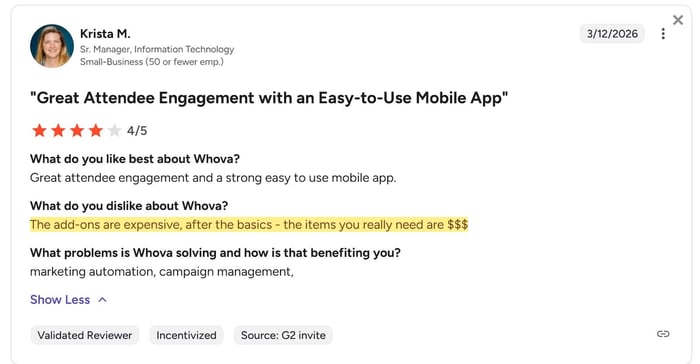
So, basically, what people are saying is that: the base platform is one cost, while the full capability is another. And if your event doesn't need the full capability, you're funding someone else's feature roadmap.
You already have registration handled and just need an event app
If you already have registration handled, through your website, Eventbrite, an association management system, or another tool, Whova’s all-in-one pricing package is worth reconsidering. Otherwise, you might be paying for a registration system you won't use in order to access the event app you actually need.
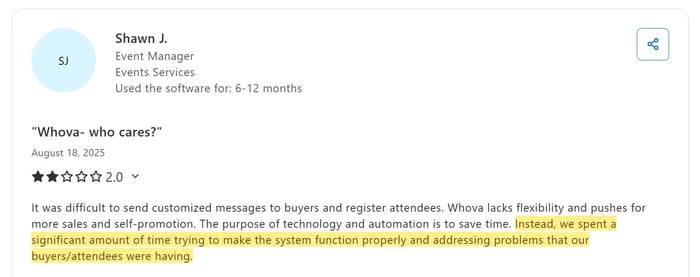
Shawn J., an event manager reviewing Whova on Capterra, captures what happens when the platform's bundled complexity doesn't match the event's actual needs: "We spent a significant amount of time trying to make the system function properly and addressing problems that our buyers and attendees were having." His review describes a platform that is "busy trying to do everything but skips the basics" — a fair characterisation of what happens when an all-in-one system is deployed for a use case that doesn't require all of it.
The more cost-effective approach when registration is already solved is a purpose-built event app — one designed specifically to handle the attendee-facing experience without requiring you to pay for capabilities you've already addressed elsewhere.
Your team is small and your event setup needs to move fast
If your team includes one or two colleagues managing event setup alongside three other full-time responsibilities, Whova’s setup and potential cost might be unfit for your needs.
"The purpose of technology and automation is to save time. Instead, we spent a significant amount of time trying to make the system function properly."
Those are the instructive words of Shawn J., an event manager dissatisfied with Whova’s long set-up time. That’s because the full setup means you might have to work through registration forms, session tracks, speaker portals, exhibitor booths, networking settings, badge templates, and notification workflows.
For a small team evaluating whether the configuration investment and the price tag are both justified by the event they're actually running, that gap matters.
Need an Affordable Event App Like Whova?
If you've read this far and found yourself in the "overkill" section more than the "right fit" section, you should probably consider whether an affordable Whova alternative might better fit your needs and budget.
LineUpr, for example, is an event app software under $200 starting price where you can launch a custom event app in hours; without needing a dedicated event tech team, a sales conversation, or an enterprise budget to make it happen.
It uses a Progressive Web App (PWA) interface, which means attendees access your event app through a browser link or QR code rather than downloading anything from an app store.
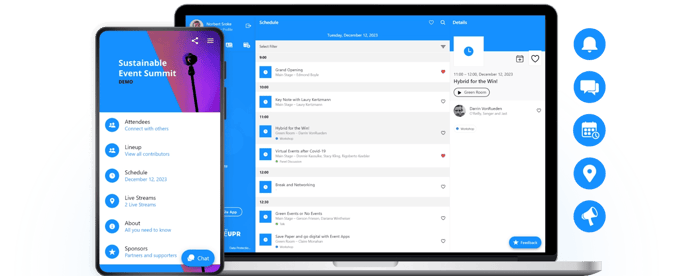
hat way you can:
Get higher attendee adoption from the start — there's no install barrier, no app store search, no storage permission request. Attendees scan a QR code at registration and they're in, before the first session starts
Stay in control of updates in real time — changes to the app go live instantly without waiting for app store approval cycles, which means your event app is always accurate, even when things change on the day
Keep the app working even when the venue Wi-Fi doesn't — LineUpr caches content on first load, so attendees retain access to the agenda and key information even when connectivity drops
And like Whova, LineUpr covers the essential event app features that most professional events actually run on, including attendee management, sponsor profile management, and agenda management.
Here’s the full feature list.
Feature | Whova | LineUpr |
Real-time agenda updates | ✓ | ✓ |
Session registration & capacity management | ✓ | ✓ |
Speaker profiles | ✓ | ✓ |
Push notifications | ✓ | ✓ |
Attendee networking & contact exchange | ✓ | ✓ |
Live polls & Q&A | ✓ | ✓ |
Post-session surveys & feedback | ✓ | ✓ |
Sponsor & partner listings | ✓ | ✓ |
Venue maps & wayfinding | ✓ | ✓ |
Offline access | ✓ | ✓ |
Exhibitor lead retrieval | ✓ | ✗ |
Built-in registration & ticketing | ✓ | ✗ |
No app store download required | ✗ | ✓ |
Want to see how it works? Start Free Today. You can build the entire app free and preview it with your team before paying anything.
“We used LineUpr during an international scouting camp with twohundred participants – and it worked perfectly. The app made it easy to keep everyone informed about schedule changes, program updates, and announcements. Push notifications were reliable, and the interface was clear and intuitive, even for first-time users.”
Julia S. [G2 Review]
“We were looking for a solution to provide our guests in a efficient, appealing and digital way all the important information about the event. Further we needed a tool for booking break-out sessions, side activities and bus transfers. We were able to implement all of this in the LineUpr app.”
Tim B. [G2 Review]
Is Whova worth the investment?
It depends entirely on what you're investing in it for. If your event is large scale and involves multiple concurrent tracks, active exhibitor program, dedicated speaker roster, and a team with the bandwidth to configure and run a full platform — then yes, Whova is worth it. The price reflects a real problem being solved at real scale, and the organisers who get the most out of it will tell you the same.
But if your event looks more like the majority of professional events — a focused annual conference, a member congress, a corporate summit — the honest answer is that Whova's pricing is calibrated for a level of complexity your event probably doesn't reach. You're not getting a bad product. You're getting the right product for the wrong event.
The mistake most planners make isn't choosing Whova over cheaper alternatives. It's benchmarking their event against the wrong reference point — assuming that because Whova is what shows up when you search, it must be what professional events require.
It isn't. Professional events require the right tool for their specific scope. For some, that's Whova. For most reading this article, it probably isn't.
If you're not sure which side of that line your event falls on, LineUpr's free tier lets you build and preview a complete event app before paying anything. No credit card, no sales call, no commitment until you're ready to go live.
